
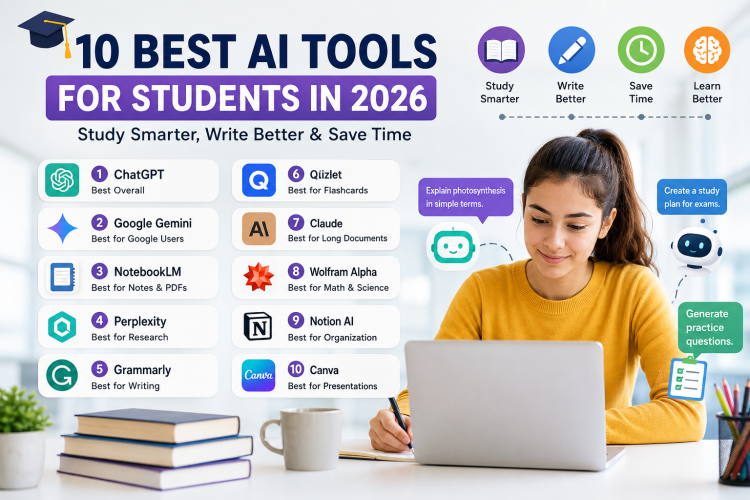
Artificial intelligence has quickly become one of the most useful technologies for students. Whether you need help understanding a difficult topic, organizing your notes, researching a subject, preparing for an exam, or improving your writing, there are now AI tools designed specifically for these tasks.
But with hundreds of AI tools available, choosing the right one can be difficult.
Some tools are excellent for research. Others are better for studying, writing, mathematics, presentations, or organizing information.
In this guide, we’ll look at 10 of the best AI tools for students in 2026, what each tool does best, who should use it, and how you can use AI responsibly to improve your learning.
Quick answer: ChatGPT is one of the most versatile options for general study help, while NotebookLM is particularly useful for studying your own PDFs and notes. Perplexity is useful for research, and tools such as Grammarly and Quizlet can help with writing and memorization.
Why Are Students Using AI Tools?
Students traditionally spend hours searching through textbooks, watching lectures, making notes, researching topics, and preparing questions.
AI can speed up many of these tasks.
For example, you can use an AI assistant to:
- Explain a difficult concept in simple language
- Create practice questions
- Summarize your notes
- Organize study material
- Generate flashcards
- Review your writing
- Brainstorm ideas
- Help you understand research papers
- Create study plans
- Practice conversations or interviews
- Find gaps in your understanding
The important point is that AI should be used as a learning assistant, not as a replacement for learning.
Using AI to understand a subject is very different from submitting AI-generated work as your own.
1. ChatGPT — Best Overall AI Tool for Students
ChatGPT is one of the most flexible AI tools available to students.
You can use it as a tutor, brainstorming partner, writing assistant, study planner, coding helper, or practice-question generator.
One of its biggest advantages is flexibility. Instead of using separate tools for every small task, you can use one AI assistant for many different types of learning.
What can students use ChatGPT for?
You can ask ChatGPT to:
- Explain difficult concepts
- Create quizzes
- Generate flashcards
- Review your answers
- Help you understand mathematics
- Explain programming concepts
- Brainstorm essay ideas
- Create study schedules
- Summarize information
- Practice interview questions
A particularly useful approach is to ask it to teach you instead of simply giving you an answer.
For example, instead of asking:
“Give me the answer to this problem.”
Try:
“Act as my tutor. Give me hints one step at a time and let me solve the problem myself.”
This makes AI much more useful as a learning tool.
Best for:
General studying, explanations, brainstorming, writing support, coding and tutoring.
2. Google Gemini — Best for Students Using Google Services
Google Gemini is another powerful general-purpose AI assistant.
It can be particularly useful for students who already use Google’s ecosystem, including Google Search, Google Docs, Gmail, Drive and Calendar.
Google has also been expanding Gemini’s student-focused capabilities. In 2026, Google introduced a dedicated student hub designed around tasks such as research, flashcards, quizzes and study organization.
What can Gemini do for students?
Students can use Gemini to:
- Explain academic topics
- Brainstorm projects
- Summarize information
- Generate practice questions
- Help organize study material
- Analyze images and documents
- Assist with research
- Create study plans
For students already using Google products every day, Gemini can be a convenient addition to their workflow.
Best for:
Students who rely heavily on Google products and want an AI assistant integrated into their workflow.
3. NotebookLM — Best for Studying Your Own Notes and PDFs
NotebookLM is particularly interesting because it focuses heavily on the information you provide.
Instead of simply asking an AI general questions, you can give it your own study material and use that material as the foundation for your questions.
For example, you might upload:
- Lecture notes
- PDF textbooks
- Research papers
- Class slides
- Study guides
- Course documents
You can then ask questions about those sources.
This can be extremely useful when preparing for exams because you can create a study assistant around your actual course material.
Example
Imagine you have a 100-page biology PDF.
Instead of reading the entire document repeatedly, you could ask:
“Create 20 practice questions based only on this document.”
Then you could ask:
“Quiz me one question at a time and don’t reveal the answer until I respond.”
This turns your study material into an interactive learning resource.
Best for:
Lecture notes, PDFs, research papers, course material and exam preparation.
4. Perplexity — Best for Research
Research can take a significant amount of time.
You may need to search multiple websites, compare information and find sources that support your claims.
Perplexity is designed around AI-assisted search and research, making it useful when you want answers accompanied by sources that you can investigate.
Students can use it for:
- Research projects
- Finding sources
- Exploring unfamiliar subjects
- Comparing information
- Creating research starting points
- Discovering websites and papers
However, you should still open and check important sources yourself.
AI can make mistakes, misunderstand sources or present outdated information.
Best for:
Research and finding sources to investigate further.
5. Grammarly — Best for Improving Writing
Writing assignments can be difficult, especially when English isn’t your first language.
Grammarly can help identify issues involving:
- Grammar
- Spelling
- Sentence structure
- Clarity
- Tone
- Word choice
- Readability
The biggest advantage is that it can help you improve writing that you have already produced.
For example, after writing an essay, you can use a grammar assistant to identify unclear sentences and mistakes.
That is generally more useful for learning than simply asking an AI to write an entire assignment.
Best for:
Grammar, proofreading, clarity and improving academic writing.
6. Quizlet — Best for Flashcards and Memorization
Memorization is an important part of many subjects.
Vocabulary, definitions, formulas, historical dates and scientific terms can all require repeated practice.
Quizlet is well known for flashcards and study activities.
You can organize information into sets and use active-recall techniques to test yourself.
Example
If you’re studying biology, you could create flashcards such as:
Question: What is photosynthesis?
Answer: The process through which plants convert light energy into chemical energy.
Instead of repeatedly reading the same textbook page, flashcards force you to actively retrieve information.
Best for:
Vocabulary, definitions, memorization and exam revision.
7. Claude — Best for Long Documents and Detailed Explanations
Claude is another powerful AI assistant that can be useful for students.
One area where students may find it particularly helpful is working with longer pieces of text.
You can use it to:
- Analyze documents
- Explain difficult readings
- Review essays
- Brainstorm ideas
- Discuss complex subjects
- Create study questions
- Get feedback on writing
Claude also offers learning-oriented functionality designed to encourage students to work through problems rather than simply receiving answers.
Best for:
Long readings, detailed explanations, writing feedback and complex topics.
8. Wolfram Alpha — Best for Mathematics and Science
General-purpose AI assistants are useful for explaining mathematics, but specialized computational tools can be better when you need reliable calculations.
Wolfram Alpha is designed around computational knowledge and can be useful for mathematics, science and quantitative problems.
Students can use it to explore topics such as:
- Algebra
- Calculus
- Statistics
- Physics
- Chemistry
- Equations
- Graphs
- Mathematical calculations
However, don’t use a computational tool simply to copy an answer.
A better approach is to ask:
“Show me how this problem is solved and explain why each step is necessary.”
That way, the tool becomes part of the learning process.
Best for:
Mathematics, calculations, science and quantitative subjects.
9. Notion AI — Best for Organization and Study Planning
Studying isn’t only about understanding information.
Organization matters too.
You may have:
- Assignments
- Deadlines
- Exams
- Projects
- Notes
- Reading lists
- Group projects
Notion can help students organize this information in one workspace, while its AI features can assist with tasks such as summarization, brainstorming and writing.
For example, you could create a semester dashboard containing:
| Task | Subject | Deadline | Status |
|---|---|---|---|
| Research paper | History | Sept. 10 | In progress |
| Mathematics assignment | Math | Sept. 12 | Not started |
| Biology revision | Biology | Sept. 15 | In progress |
A structured system like this can make it easier to see what needs to be done.
Best for:
Notes, organization, project management and study planning.
10. Canva — Best for Presentations and Visual Projects
Students frequently need to create presentations.
Canva makes it easier to create slides, posters, infographics and other visual materials.
Its AI-powered features can also help with generating ideas and accelerating parts of the design process.
This can be useful when you need to turn a complicated subject into a presentation that is easy for an audience to understand.
Best for:
Presentations, posters, infographics and visual assignments.
Quick Comparison: Best AI Tools for Students
| AI Tool | Best For | Ideal User |
|---|---|---|
| ChatGPT | General study help | Almost every student |
| Google Gemini | Google ecosystem | Google users |
| NotebookLM | Notes & PDFs | Exam preparation |
| Perplexity | Research | University students |
| Grammarly | Writing | Essay writers |
| Quizlet | Flashcards | Exam preparation |
| Claude | Long documents | Researchers & writers |
| Wolfram Alpha | Mathematics | STEM students |
| Notion AI | Organization | Busy students |
| Canva | Presentations | Visual projects |
How to Choose the Right AI Tool
You don’t need to use every AI tool available.
Instead, choose tools according to the problems you actually have.
If you struggle with understanding concepts
Try ChatGPT, Gemini or Claude.
If you have lots of lecture PDFs
Try NotebookLM.
If you’re doing research
Try Perplexity and verify the sources it provides.
If you need better writing
Try Grammarly.
If you’re memorizing information
Try Quizlet.
If you’re studying mathematics
Try Wolfram Alpha alongside your textbook or teacher.
If you’re disorganized
Try Notion.
If you’re making presentations
Try Canva.
How to Use AI Without Becoming Dependent on It
AI can make studying easier, but there is a potential problem.
If you ask AI to do everything for you, you may finish assignments faster without actually learning the material.
A better strategy is to make AI challenge you.
Instead of:
“Write my essay.”
Try:
“Help me create an outline for my essay and ask me questions that will help me develop my own arguments.”
Instead of:
“Solve this math problem.”
Try:
“Give me one hint at a time and let me solve it.”
Instead of:
“Summarize this chapter.”
Try:
“Quiz me on this chapter and explain the questions I get wrong.”
This turns AI from a shortcut into a personal tutor.
Important: Don’t Trust AI Blindly
AI systems can make mistakes.
Even when an answer sounds confident, it may be inaccurate.
Before using AI-generated information in an important assignment, research paper or presentation:
- Check the original source.
- Verify important facts.
- Check dates and statistics.
- Confirm quotations.
- Read the source yourself.
- Follow your school’s AI policy.
This is especially important for academic research.
Can Students Use AI for Assignments?
It depends on the rules of your school, college or university.
Some institutions allow AI for brainstorming, proofreading or tutoring.
Others have stricter policies.
The safest approach is to check your institution’s academic-integrity policy before using AI on assessed work.
A good general rule is:
Use AI to help you learn, not to pretend that AI-generated work is your own.
You can use AI to explain concepts, generate practice questions, review your writing and help you organize your ideas while still doing the intellectual work yourself.
Final Verdict
AI tools can be incredibly useful for students in 2026.
You don’t need a dozen subscriptions to benefit from them.
For most students, a simple combination can be enough:
ChatGPT or Gemini + NotebookLM + a writing tool + a flashcard system.
Use ChatGPT or Gemini as a flexible tutor, NotebookLM for your course material, Grammarly for writing feedback and Quizlet for memorization.
The most important thing isn’t which AI tool you choose.
It’s how you use it.
Students who use AI to ask better questions, practice difficult concepts, test their knowledge and improve their work can turn these tools into powerful study assistants.
The goal isn’t to study less.
The goal is to study smarter while actually understanding what you’re learning.
Frequently Asked Questions
What is the best AI tool for students in 2026?
There isn’t one tool that is best for everyone. ChatGPT is a strong general-purpose choice, while NotebookLM is particularly useful for studying your own notes and PDFs. Perplexity is useful for research, and Quizlet is useful for memorization.
What is the best free AI tool for studying?
The best option depends on the task. ChatGPT, Gemini and NotebookLM all provide useful capabilities for different study workflows, although available features and limits can change over time.
Can AI help me study for exams?
Yes. You can use AI to generate practice questions, explain difficult concepts, create flashcards, summarize your notes and simulate quizzes.
Can AI write my college essay?
AI may be technically capable of generating an essay, but whether you’re allowed to submit AI-generated work depends on your institution’s rules. A safer educational use is to have AI help brainstorm, outline, critique and improve your own work.
Is AI good for mathematics?
AI can be useful for explaining mathematical concepts and working through problems. For calculations and computational mathematics, specialized tools such as Wolfram Alpha can also be useful.
Should students pay for AI tools?
Not necessarily. Many AI services offer free versions. Start with free tools and only pay when a premium feature solves a problem you actually have.
Related Articles You May Want to Read
- Best AI Tools for College Students
- Best Free AI Tools for Students
- Best AI Tools for Research
- Best AI Writing Tools for Students
- Best AI Tools for Mathematics
- How to Use ChatGPT as a Study Tutor
- Best AI Tools for Making Presentations



No Comments
Leave Comment